v1.1.4 Open source · GPL-3.0 · Linux, Windows & macOS

Your Music.Your Freedom.

Senthym is a Spotify-style music player written in pure Rust. Search and stream from YouTube Music, Deezer and SoundCloud with no ads, no subscription and no API keys. Play your own files, read synced lyrics and watch official music videos up to 1080p.

Linux, Windows & macOSPure RustNo ads, no keysFree & open source
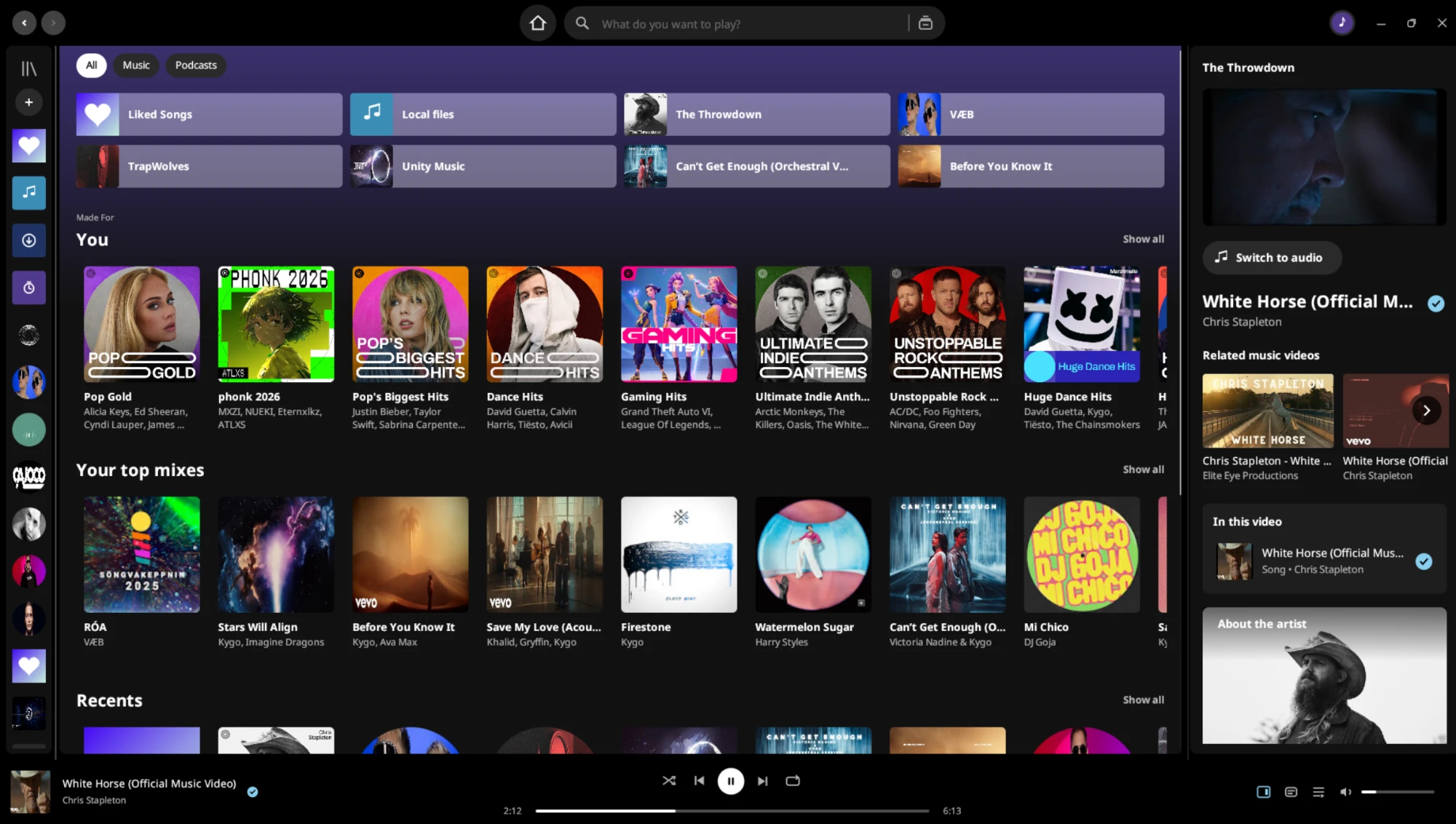
Senthym: the Home screen and the Now Playing panel showing a music video

Features

Everything you expect from a modern music app, with the interface you already know and nothing between you and your music.

Sources

Three sources, no keys

YouTube Music is already set up. Deezer and SoundCloud are searched alongside it. No account and no API key needed; Spotify can be added optionally with your own key.

Search

Search that gets out of the way

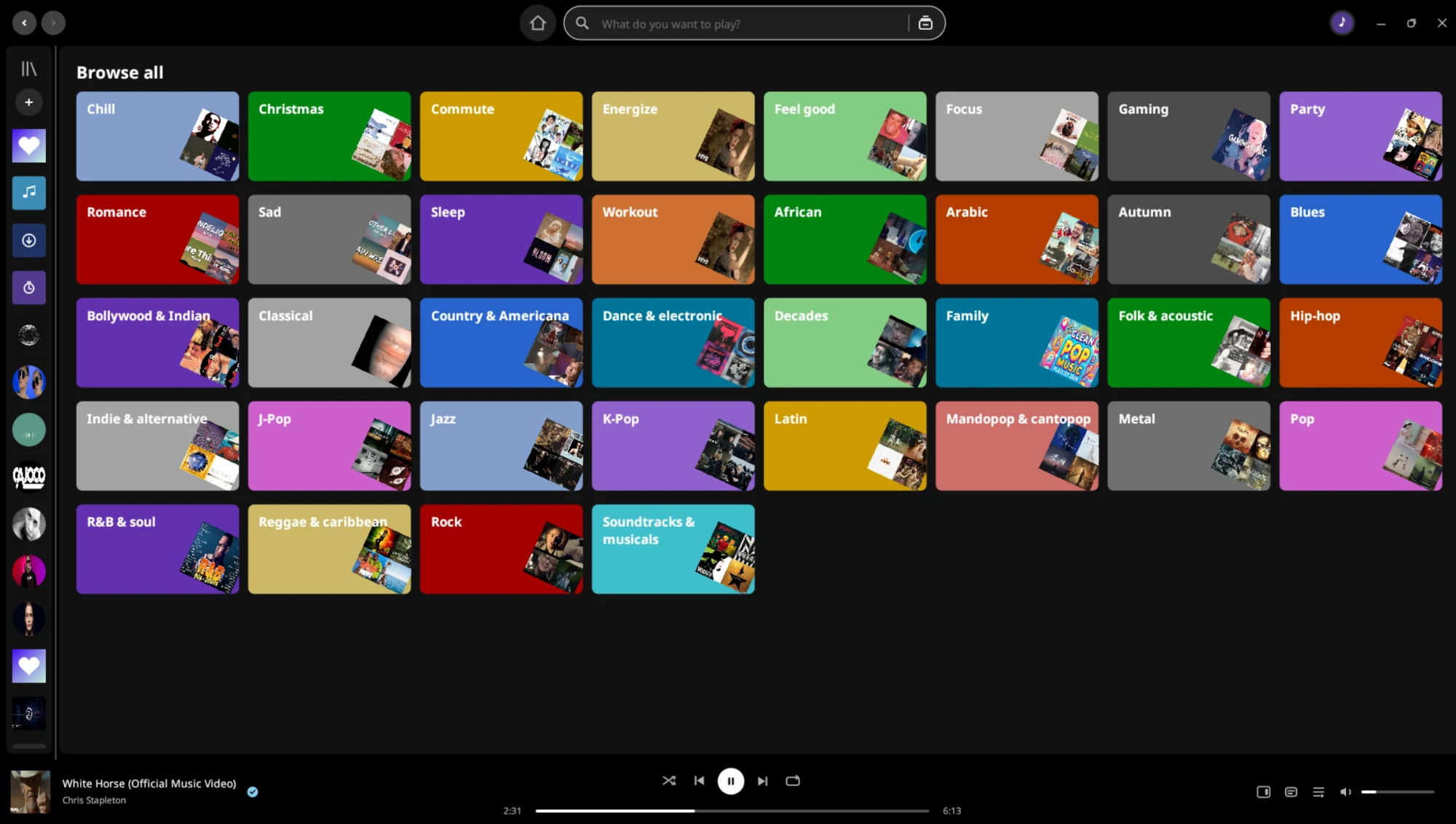
Suggestions as you type, recent searches with covers, Browse all with genre and mood tiles, and each song listed once even when three sources have it.

Playback

Starts instantly

Senthym gets songs ready before you press play: what you hover over, what is on screen and what plays next. Queue, shuffle, repeat, history and crossfade included.

Video

Music videos, up to 1080p

Official videos, or the artist's live, acoustic and sessions films when there is no studio video. Every video is checked against the song. Switch to audio with one click.

Quality

Quality that follows you

Auto by default, or pick 1080p down to 240p. Changes land in a fraction of a second, with mini player, full screen and related videos over the picture.

Lyrics

Synced lyrics, translated

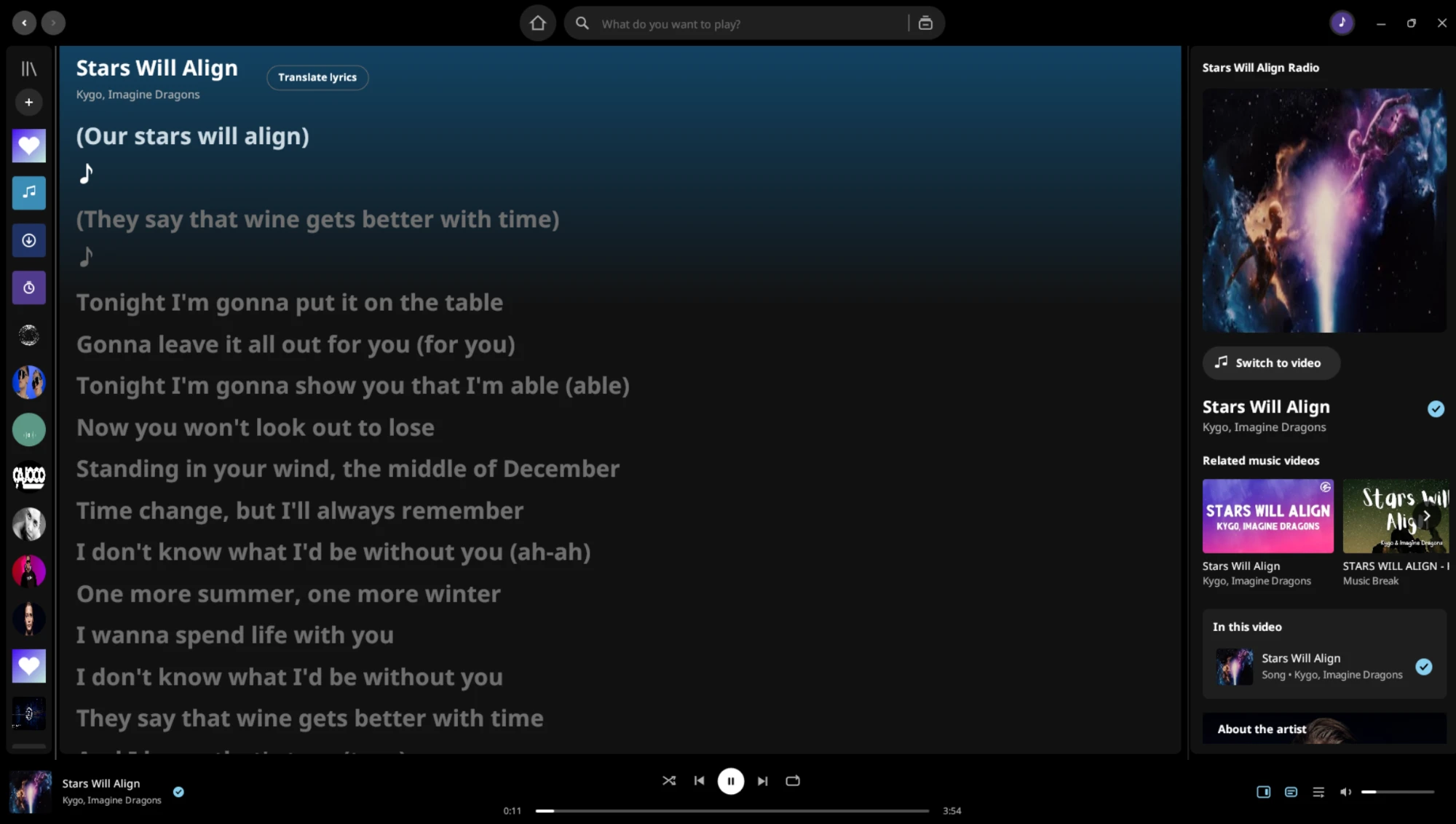
Line-by-line lyrics that follow the song, translated into your language, and kept in time even when a video opens with a scene before the music.

Library

Playlists with your own cover

Create playlists with a name, description and cover picture. Liked Songs, followed artists and saved albums live together, with a rail or a full grid.

Control

Hide in this playlist

A song stays in the list, greyed out, and is skipped when it is time to play. Works in every playlist, Liked Songs included, with an Undo.

Autoplay

Follows your taste

When your queue ends, Senthym blends the radios around what you actually chose, adapts within a couple of songs and rests artists you skip.

Reliable

If a song fails, another source plays

When a song can't be fetched, Senthym tries SoundCloud and another upload at once instead of skipping it, and tells you where it came from.

Yours

Your files and downloads

Play music from your computer next to the online library, download songs to keep them offline, and sign in with Google to bring in your own library.

Updates

Updates inside the app

Settings → Updates checks the releases page, downloads the right package, verifies it, installs it and reopens Senthym with your library and sign-in kept.

See it

A library on the left, the song bar at the bottom and the Now Playing panel on the right. If you have used a music app before, you already know where everything is.

Browse all: genre and mood tiles with covers

Browse all, with genre and mood tiles

Synced lyrics with the Now Playing panel

Synced lyrics with translation

How it works

Senthym comes already set up. Open it, type a song and press play. There is nothing to configure, no account to create and no key to enter.

Search

Results from YouTube Music, Deezer and SoundCloud appear together, merged so each song shows once. Remixes, live versions and covers stay separate.

Play

Senthym's own streaming engine fetches the song and plays it through its audio player, so crossfade, volume, seeking and lyrics work the same for every source.

Watch

If the song has an official video, the picture plays in sync with the sound. Switch between video and audio at any moment, at the same position.

Keep going

When the queue ends, autoplay blends songs from what you chose. If a source fails, another one takes over.

Light and fast

Senthym is written in Rust and draws its own interface: no Electron, no web view. It starts quickly, stays small and keeps the music steady even while a 1080p video is playing.

Small downloads

The Windows program is a single 13 MB file and the .deb is about 5 MB. The AppImage and Flatpak are bigger because they carry ffmpeg inside.

Light on memory

About 140 MB when idle and about 155 MB while playing a song, measured on Linux. Pictures are capped at about 450 MB and the song cache at 1 GB.

The sound never waits

Audio has its own thread, and the video decoder runs at a lower priority, so a heavy picture can't make the music stutter.

Ready before you ask

Songs are prepared while you hover over them, scroll past them and queue them, so the next one starts at once and searches open instantly.

Instant quality changes

Every video quality is looked up in one go, so switching between 240p and 1080p takes a fraction of a second (0.1 to 0.4 s in our tests) and never freezes the picture.

Never stuck

If a source refuses a song, Senthym tries SoundCloud and another upload at the same time and plays the first that works.

Honest status

Senthym was designed and tested on Linux (Ubuntu 26.04.1 LTS) and is tested on Windows too. macOS works but gets less testing. Every release lists what is done, what was fixed and what is not.

Read the roadmap Changelog Report an issue Ask on Discord

DOWNLOAD

Get Senthym.

Prebuilt packages with ffmpeg included where it is needed. Free and open source under the GPL.

Linux

AppImage, .deb, .rpm and Flatpak, for x86_64 and ARM64. The AppImage needs no installation and has ffmpeg inside.

$ chmod +x Senthym-linux-*.AppImage
$ ./Senthym-linux-*.AppImage

macOS

One universal app for Apple silicon and Intel, in a disk image. It is not notarized: clear the quarantine before the first launch.

$ xattr -dr com.apple.quarantine \
  /Applications/Senthym.app

Windows

Windows 10 and 11. One file: download it and run it. SmartScreen warns because the file is not code signed. The first start fetches the video decoder by itself.

From source

Rust stable, ffmpeg on your PATH (Linux) and working sound output. The README has the full guide.

$ cd app
$ cargo build --release
Senthym was designed and tested on Linux and Windows. The macOS build gets less testing: if you find a bug on any system, please open an issue. All packages are on the Releases page.

OPEN SOURCE

Built in the open.

Issues and pull requests are welcome. The code layout is documented, every release lists what changed and what is not done yet, and CI builds every package you can download here.